


Tina Live - Match & Video Call
4.423.00 Reviews
App Specs
- Version
- 1.1.5
- Updated On
- License
- Free
- Downloads
- 1,000,000+
- Developer
- mimuna
- Categories
- Social
- Platform
- Android
Screenshots

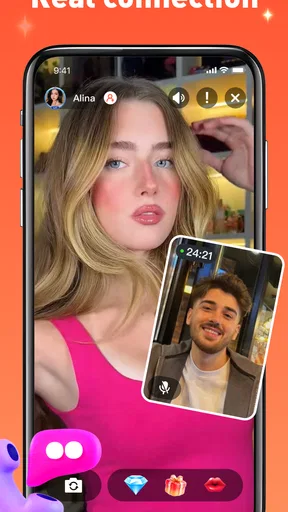
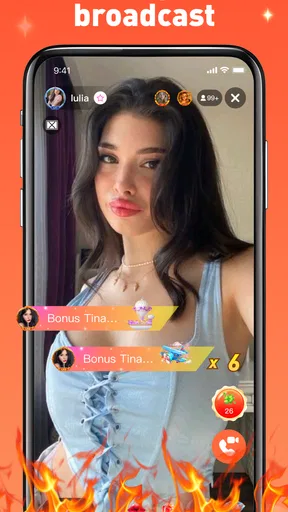
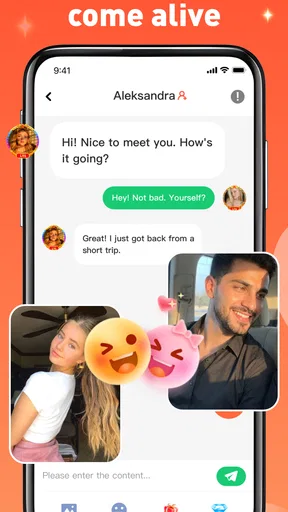

 Analysis by AppCompare
I approached Tina Live - Match & Video Call as someone looking for a quicker way to meet people online rather than another feed to scroll through. It is a social app from mimuna, and its central idea is simple: move from discovery toward a live conversation. That makes it feel more immediate than the usual profile-based networks, but it also means you need to be comfortable with a faster, less predictable style of interaction.
My first impression was that this is best understood as a spontaneous social space. You are not opening it mainly to organize existing friendships, follow creators, or keep up with a familiar community. You are opening it when you want to meet someone new and decide fairly quickly whether a conversation is worth continuing. That focus gives the app a clear identity, although it also makes the experience more dependent on your mood, your boundaries, and the quality of the people you happen to encounter.
The app is free to install, with optional purchases ranging from $0.99 to $159.99 per item. I would treat that combination carefully: the free entry point makes it easy to try, while the broad purchase range is a reason to understand the app first instead of spending immediately. It is intended for mature users aged 17 and over, which fits the nature of live social contact and is important to keep in mind before creating an account.
What the first session feels like
When I test a social app like this, I do not judge it by how quickly it shows me a screen full of profiles. I look for the moment when the app helps me make a meaningful choice: continue with a person, move on, or close the conversation without feeling pressured. Tina Live is most appealing when you want that decision to happen in the same sitting rather than after days of messaging.
The store summary, “Meet and Chat Instantly,” describes the intended rhythm well without telling the whole story. The important difference is the live emphasis. A conventional social network gives you time to shape your profile, browse quietly, and respond later. A video-call-oriented service asks you to be more present. That can create a warmer connection when both people are ready, but it can also feel abrupt if you prefer long introductions before any live exchange.
I would recommend starting with a small goal. Do not install it expecting to build a large social circle in one evening. Instead, aim to complete one comfortable conversation, learn how matching and calling fit together, and decide whether the pace suits you. That approach keeps the first session manageable and helps you evaluate the actual experience rather than chasing every available interaction.
The audience size is already substantial, with more than a million installs and an average rating of 4.4 from around seven thousand ratings. Those figures suggest that the concept has found an audience, but they should not be treated as a guarantee that every match will be enjoyable. Social apps are personal by nature: the same fast-moving format that feels exciting to one person may feel tiring or intrusive to another.
Worth Reading Before You Choose

EA SPORTS FC Mobile 26 Is a Bigger Football Game, but It Takes Time

Flipboard Shows What News Apps Must Do Beyond the Feed

Switching to Android Auto Means Rethinking Your Driving Routine

Google Calendar Makes a Crowded Week Easier to Manage

Ludo King Makes the Most of the Minutes Between Plans

Baby Panda World Brings Quick Play to Modern Phones, but Its Game Library Feels Busy
Who will get the most from it
I see the strongest fit for people who enjoy meeting strangers, can make quick conversational decisions, and are willing to use live interaction as part of the introduction. It may work particularly well if ordinary text-only matching feels too slow or if you find that written profiles do not tell you much about someone’s personality.
It is less suitable for anyone who wants a carefully filtered professional network, a private messaging tool for existing contacts, or a quiet community built around a shared hobby. Those users may be happier with an established messaging service, a traditional dating platform, or a group-based social network where conversation develops gradually. Tina Live has a narrower purpose, and that is a strength only when the purpose matches what you want.
Getting through setup without rushing
For a first-time user, the best setup strategy is to move slowly even if the app itself encourages immediacy. Use a profile presentation that feels accurate without revealing information you would normally keep private. A live social app can make a casual interaction feel personal very quickly, so I would avoid including a workplace, home area, daily routine, or other details that make it easy for a stranger to identify you offline.
I also recommend deciding your boundaries before the first call. Choose what kinds of conversations you are comfortable having, whether you want to appear on camera immediately, and what you will do if someone becomes pushy. This is not unnecessary caution; it is a practical way to keep control in an environment where the other person may expect a fast response. A simple exit rule, such as ending the interaction when the tone stops feeling respectful, is more useful than trying to explain yourself repeatedly.
Because the app is rated for mature users, families should not treat it like a general-purpose chat app for younger children. If you are setting it up on a shared device, consider who can access the account and whether notifications might reveal more than you want displayed on the lock screen. These small checks take little time and make the experience less stressful later.
The current release is version 1.1.5 and supports devices running Android 7.0 or later. That broad compatibility is helpful if you use an older Android phone, but live communication can still feel less comfortable on aging hardware than on a newer device. Before blaming the app for a poor session, I would check whether your phone handles video smoothly and whether your connection is stable enough for real-time interaction.
What I would do before making a purchase
I would use the free experience first and postpone every optional purchase until I understood the basic flow. The available in-app items span from less than a dollar to well over a hundred dollars, so the safest habit is to identify exactly what an item changes before confirming anything. A low entry price does not automatically make a purchase useful, and a higher-priced item deserves especially careful consideration.
My rule would be simple: pay only for something that solves a problem I have already experienced and can clearly describe. If I am still learning how matching works, spending money adds noise to the test. First-time users should also make sure the device account has purchase confirmation enabled, particularly if the phone is shared or used by more than one person.
Reaching the first meaningful success
The first successful action is not merely opening a call. It is finding a conversation that feels mutual enough to continue for a few minutes without either person forcing it. I would begin with a short, ordinary greeting and one open question that gives the other person room to answer. A simple exchange about interests or what brought them to the app is more useful than trying to sound impressive.
Keep the first call deliberately light. You are testing comfort and communication, not conducting an interview or making a commitment. If the other person responds thoughtfully, asks something back, and respects the pace, you have learned more than a profile card could tell you. If the exchange is silent, uncomfortable, or one-sided, moving on is a successful result too; the purpose of matching is to find a suitable interaction, not to rescue every one.
One practical technique is to set a personal time limit for the first few conversations. I find that a short trial removes the pressure to stay indefinitely and makes it easier to compare the quality of different interactions. It also protects your attention. Live social apps can turn a quick check-in into a much longer session because every new possibility feels immediate.
Another useful habit is to pause between calls. Do not treat every new match as a reason to continue automatically. Take a moment to decide whether you are enjoying the interaction, whether the other person is listening, and whether you feel comfortable with the direction. That pause is easy to skip, but it is one of the best ways to keep the app working for you instead of controlling the pace.
A realistic everyday example
Imagine finishing work or classes with a little time available but no interest in writing a long profile or joining a large public group. You open Tina Live, spend a few minutes getting oriented, and start with one conversation rather than trying to contact everyone you see. The first person may not be a fit. The second may be friendly but too quiet. A later call might produce an easy exchange about music, travel, or daily routines.
In that situation, the value is not that the app guarantees an instant friendship. The value is that it reduces the distance between noticing someone and hearing how they actually communicate. If the conversation ends politely, you still have a useful answer about compatibility. If it develops naturally, you have reached the kind of immediate connection the app is designed to encourage.
Where new users can become confused
The biggest source of confusion is assuming that a match automatically means a good conversation. Matching only creates an opportunity. It does not tell you that the other person shares your expectations, wants to use video, or will respond in the same way you do. I would avoid interpreting a skipped interaction as a personal judgment. In a fast social environment, people often make quick choices for reasons that have nothing to do with you.
Another point worth understanding is the difference between availability and compatibility. Someone who responds quickly may not be a better match than someone who takes longer. Likewise, a lively first minute does not prove that the conversation will remain respectful. Pay attention to consistency: does the person answer what you say, accept a boundary, and allow the exchange to feel balanced?
Video can also create pressure that text does not. You may feel expected to look prepared, speak constantly, or reveal more of yourself than intended. I would treat the camera as an option to approach on your terms, not as a test you must pass. If you are not ready for live visibility, it is sensible to wait until you understand the interaction and feel comfortable with the person.
Notifications and repeated invitations can make the app feel more demanding than expected. I would review the notification behavior during the first session and reduce interruptions if they begin to compete with work, sleep, or personal time. A social app is more enjoyable when you choose when to return rather than responding to every prompt immediately.
Handling awkward or unwanted interactions
Live conversations sometimes go wrong quickly. If someone asks for private information, pressures you to continue, makes sexual comments, or ignores a clear request to stop, end the interaction instead of negotiating. The mature age rating does not remove the need for personal judgment, and it should never be read as permission to tolerate behavior that makes you uncomfortable.
I would also avoid moving a new contact to another service right away. Keeping the early conversation inside the app gives you more separation between a new interaction and your personal accounts. Do not send money, share passwords, provide verification codes, or agree to meet privately based only on a pleasant first call. A convincing conversation is not the same as a verified identity.
These precautions are especially important because the app’s appeal comes from immediacy. Speed can make an exchange feel more trustworthy than it really is. My advice is to enjoy the spontaneity while keeping decisions about privacy, money, and offline contact much slower.
How it compares with familiar social alternatives
Compared with a standard social network, Tina Live feels less useful for maintaining an existing circle. You are not choosing it because you want a timeline of updates from people you already know. Its advantage is the possibility of a direct, live introduction, while its trade-off is that you have less time to evaluate someone before the interaction begins.
Compared with text-first matching apps, it can shorten the period of uncertain messaging. You may learn quickly whether conversation flows naturally, which is valuable if you dislike exchanging dozens of short messages that never lead anywhere. The downside is that a call demands attention immediately and can be harder to fit into a busy day. Text is more forgiving when you are tired, commuting, or not ready to be seen.
Compared with group chat communities, the experience is more personal but usually less anchored by a shared topic. A hobby group gives you an instant subject to discuss and a reason to return. Tina Live is better when your main interest is the person rather than the community theme. If you need structured conversation, moderation around a specific interest, or a persistent group identity, another category of app may serve you better.
That comparison helped me place the app correctly. It is not a replacement for every social tool. It is a focused option for people who want to move toward live conversation sooner and are comfortable managing the uncertainty that comes with that choice.
My practical routine for using it well
I would begin each session with a purpose: meet one new person, test whether live conversation suits me, or return to a contact I genuinely enjoyed. A purpose prevents endless swiping or matching without engagement. After each interaction, I would make a quick private note about how it felt rather than trying to remember every detail later.
I would also separate curiosity from commitment. It is fine to explore different conversations, but there is no need to keep every contact active. If someone is respectful and the exchange is enjoyable, continue naturally. If the connection is weak, ending it politely is more honest than leaving the other person waiting while you keep searching.
For users considering purchases, I would review spending after several free sessions rather than during the excitement of a first call. Ask whether the app already provides the kind of experience you wanted and whether an item would genuinely improve it. Since the purchase range reaches from $0.99 to $159.99 per item, this is one place where a pause is more valuable than impulse.
Finally, I would keep expectations realistic. A successful first call may be a good conversation, a clear sense that someone is not compatible, or a better understanding of my own boundaries. None of those outcomes guarantees a lasting connection, but each one helps me use the app more intelligently next time.
My recommendation after trying the concept
Tina Live - Match & Video Call makes sense when you want social discovery to feel immediate and personal. I like the directness of its concept: instead of hiding behind endless profile browsing, you have the chance to judge communication in real time. That can save effort for people who connect better through voice and video than through carefully written messages.
At the same time, I would not recommend it blindly. You need patience with uneven matches, a firm approach to privacy, and enough comfort with live interaction to avoid feeling pushed into conversations. People who prefer slow introductions, established friend groups, or topic-based communities should probably choose a different kind of social app.
The developer, mimuna, has positioned this as a mature social experience rather than a general chat utility. Its free availability makes a cautious trial reasonable, and the broad Android support lowers the hardware barrier for many users. My advice is to start without spending, complete one respectful conversation, and judge the app by how much control and comfort you retain while using it.
For me, the deciding question is not whether every interaction is memorable. It is whether the app helps you reach worthwhile conversations without making you surrender your time or boundaries. If your answer is yes, this is a promising addition to your social toolkit. If the live format feels too fast, the usual text-first or group-based alternatives will likely be a better fit.
Pros
- Live video matching makes meeting new people feel immediate and interactive.
- Quick matching keeps conversations moving without a lengthy setup process.
- The app offers an entertaining way to socialize from home.
- Video calls can help users get a better sense of someone’s personality.
- Simple navigation makes the main matching features easy to access.
Cons
- Video chat quality can vary depending on connection speed and device performance.
- Some conversations may feel repetitive or end unexpectedly.
- Users may encounter profiles that are inactive or poorly completed.
- In-app purchases may be needed to unlock certain interaction features.
- Use caution when sharing personal information with people you meet online.
FAQs for Tina Live - Match & Video Call
What is Tina Live - Match & Video Call?
Tina Live - Match & Video Call is a social discovery app designed for meeting people through profiles, matching features, messaging, and live video conversations. After creating an account, users can browse available members, show interest, and potentially connect when the interest is mutual. The app is mainly focused on casual social interaction, making new connections, and real-time conversations rather than traditional dating alone.
How does matching and video calling work in Tina Live?
The app generally lets you explore user profiles and interact with people you find interesting. Depending on the available features and account status, a mutual match may allow messaging or a video call. Video conversations require a stable internet connection and access to your device’s camera and microphone. Before accepting a call, review the person’s profile and only share information when you feel comfortable.
Is Tina Live - Match & Video Call free to use?
Tina Live can usually be downloaded without an upfront payment, but some functions may be limited or supported by in-app purchases, virtual credits, subscriptions, or premium memberships. Features such as extended messaging, additional matches, or certain video-call options may require payment. Check the current pricing, renewal terms, and refund policy in the Google Play Store or Apple App Store before purchasing.
Is Tina Live safe and suitable for everyone?
As with any social or video-chat platform, Tina Live should be used carefully. Avoid sharing your address, financial details, passwords, private documents, or other sensitive information with strangers. Use the report and block tools if someone behaves suspiciously or offensively. The app may be intended for adults or mature users, so review its age rating, privacy policy, and community guidelines before creating an account.
What permissions and personal information does Tina Live require?
To provide matching, messaging, and video-call functions, Tina Live may request information such as an email address, phone number, profile details, photos, location preferences, and access to the camera and microphone. Some permissions may be optional, but refusing essential access can affect certain features. Before signing up, review the app’s privacy policy and adjust permissions in your Android or iOS settings.


